Theater · Stage Management · Software

GhostLight

I'm the stage manager for Cardinal Newman's theater. Ghost Light is the app I built to fix our crew's most common problem: remembering which set piece goes where, and what changes between scenes.

6th
Year in Theater
SM
Stage Manager, 2026–27
59
Automated Tests

Behind the curtain

From crew to
stage manager

I joined the backstage crew in 7th grade, spent two years as Assistant Stage Manager, and this year I'm the Stage Manager, including for our production of Mary Poppins. The job is keeping the show on track: organizing the crew, knowing every scene change, and running things backstage during performances.

I'm also the theater department's photographer, so I see the shows from both sides of the curtain.


The problem

Nobody remembered
where things went.

Every show, the same thing happened: the crew couldn't remember which set piece went where, or what changed between scenes. Paper lists went out of date the moment someone changed the blocking. So I built Ghost Light.

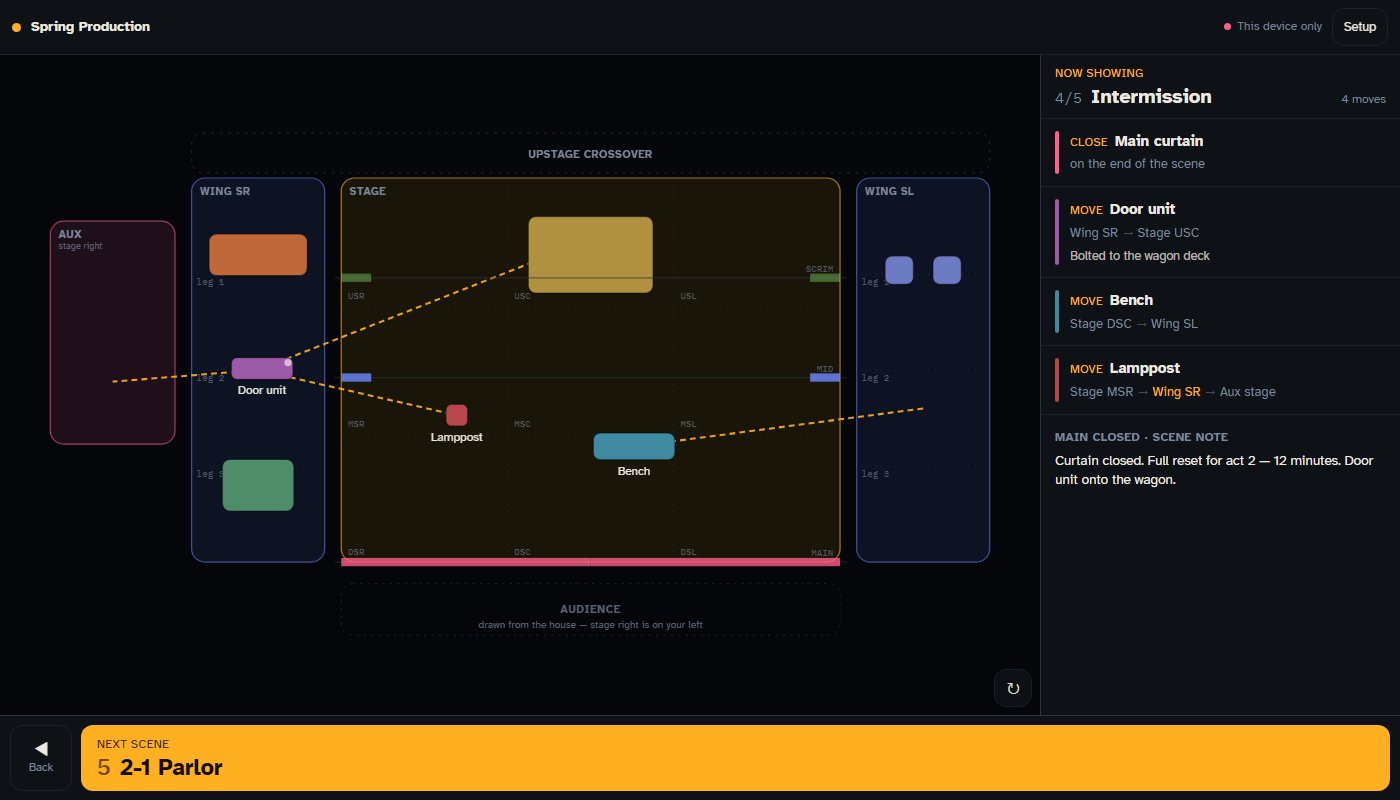
The stage manager moves the show to a scene, and every crew member's phone follows along, playing an animated ground plan that shows exactly what moves where.

Ghost Light showing a top-down ground plan of the stage and wings, with dashed paths for each set piece and the list of moves for the current scene
What the crew sees: the ground plan on the left, this scene's moves on the right, and the next scene at the bottom.

What it does

Built around
a real stage

  • A real ground plan. Drawn from the audience's point of view, with a 3×3 stage grid, both wings, our aux stage, and the three curtains where they actually hang.
  • Move lists are computed, never typed. Each scene stores where every piece sits, and the app compares scenes to work out what moves. The crew list can't drift out of sync with the plan.
  • Routes that match the building. A piece going from one wing to the other travels around the upstage crossover, never across the stage.
  • Everything in feet. Set the stage's real width once, and every piece reads out at its real size.
  • Backstage mode. A dimmer that goes down to a dark red, plus a screen-wake lock, so a phone in the wings doesn't spill light into the audience.
  • A printable scene list, because you can't count on theater Wi-Fi.

Engineering

No server,
still in sync

Ghost Light has no backend. When the stage manager calls the next scene, the page rebuilds its own source with the new show data and republishes itself, and every open phone reloads to the new version within a few seconds.

  • 59 automated tests run on every push, covering move calculations, routes, curtains, backstage mode, and the self-rebuild
  • Tests find buttons by the words on them, so a test fails when the interface stops saying what it does
  • Source split into small modules for editing, then combined into one file by a build script

Design for the dark

One big button,
always in the same place

During a show, a crew member is looking at a phone in the dark with one free thumb. So the main control sits on the bottom edge of the screen, is the biggest thing on the page, and never moves or changes meaning. Editing lives on a separate screen, so nothing can be changed by accident mid-show.

Some parts took several tries. My first two versions of the piece editor covered up the very part of the stage I was editing. The third uses small handles and a menu you open only when you need it.

Stage Management JavaScript SVG Automated Testing GitHub Actions UX Design

Try the demo View the code Back to Portfolio